NVIDIA Shield TV Pro Review: Still the Best Android TV Box?
Our NVIDIA Shield TV Pro review: still the fastest, most capable Android TV box seven years on. Not cheap or new, but nothing else does everything it does.
Verdict: the best Android TV box, if you'll use the power
Fast, beautifully supported and packed with features. Overkill for basic streaming.
If you want a box that stays quick with huge channel lists and media libraries, makes HD look better on a 4K TV, and keeps getting updates years later, the Shield TV Pro is still the one to buy. If you just watch the big streaming apps, a cheaper streamer will do the job.
Pros
- Still faster than any other Android TV box
- Best-in-class AI upscaling of HD to 4K
- Dolby Vision, HDR10 and Dolby Atmos
- Gigabit Ethernet and two USB 3.0 ports
- Remarkable software support, still updated in 2026
- Brilliant for home media libraries
Cons
- Expensive for hardware first sold in 2019
- No AV1 decoding or Wi-Fi 6
- Only 16 GB of built-in storage
- No HDMI cable or game controller in the box
- Remote rolls easily and its wheel isn't backlit
This NVIDIA Shield TV Pro review comes seven years after the box arrived in late 2019, and in a market where streaming boxes are replaced every year or two, it has never really been beaten. It's an Android TV box first: you plug it into your TV, sign in with a Google account and install apps from Google Play. But it's also a media server, a cloud gaming machine and, thanks to NVIDIA's AI upscaling, a genuine picture upgrade for anything below 4K.
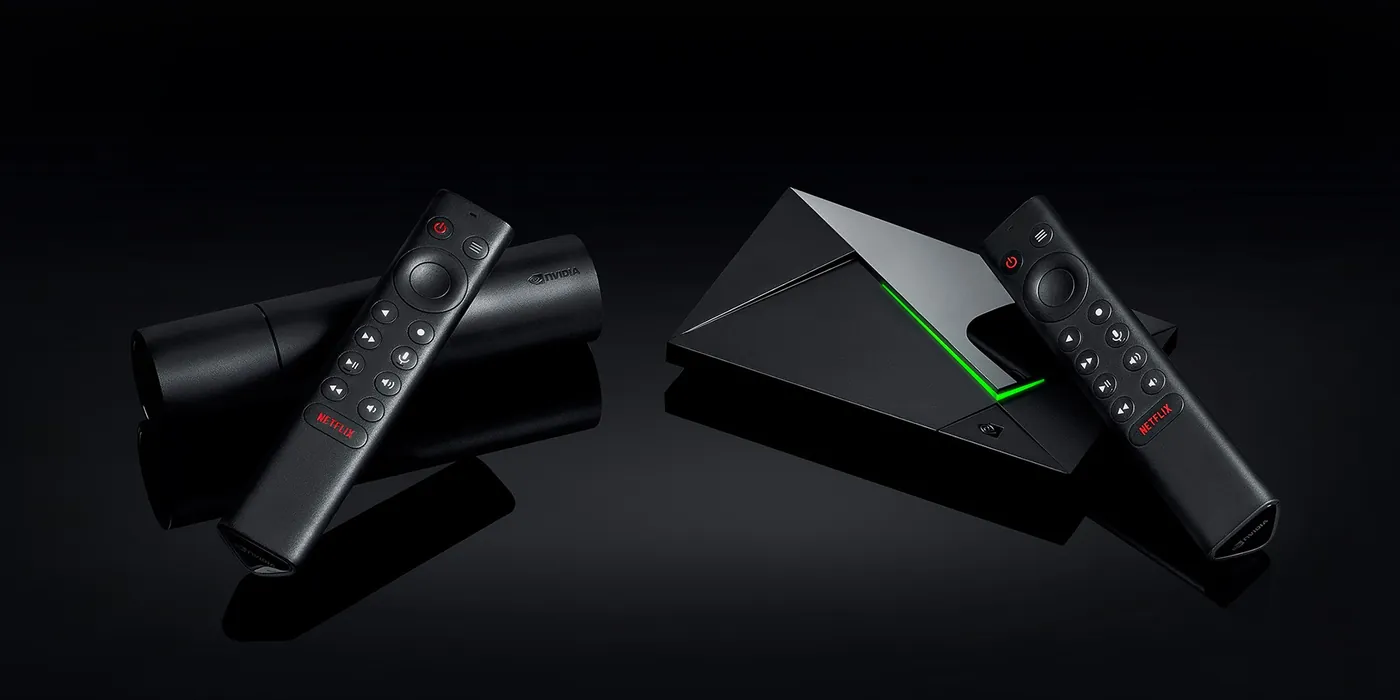
There are two Shields. The cheaper Shield TV is a small tube designed to hide behind the TV. The Shield TV Pro, reviewed here, is the one with more memory, more storage, USB ports and the extra headroom that makes it the enthusiast's choice. New to all this? Start with how Android TV and Google TV differ.
Design and what's in the box
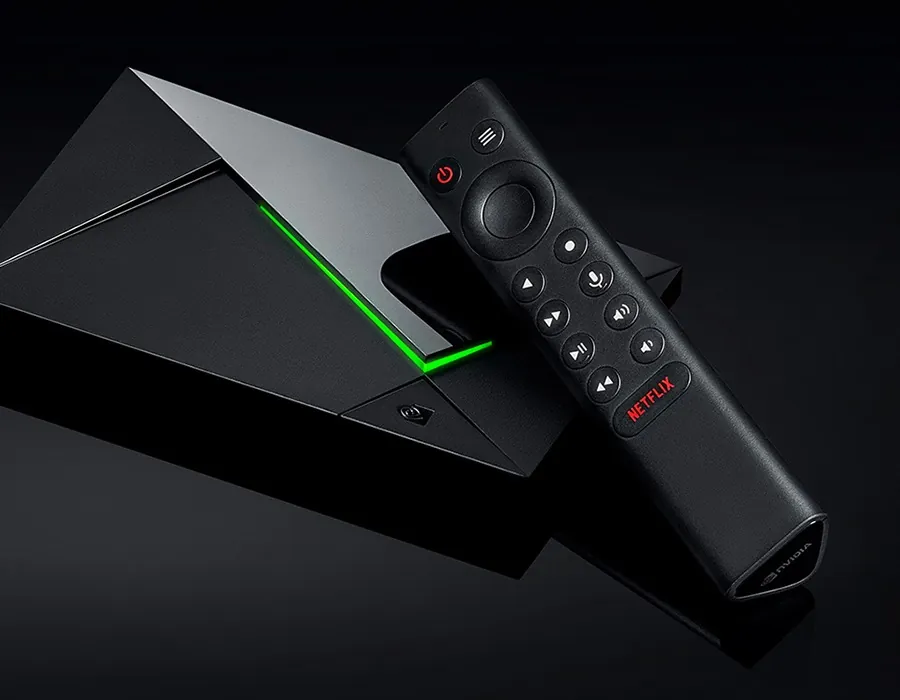
For the power inside, the Shield TV Pro is small: a slim, angular wedge roughly the size of two paperbacks stacked together. It can lie flat beside your other AV gear or stand upright in an optional stand, and a green light strip shows it's on. The brightness is adjustable, which is handy in a dark room.
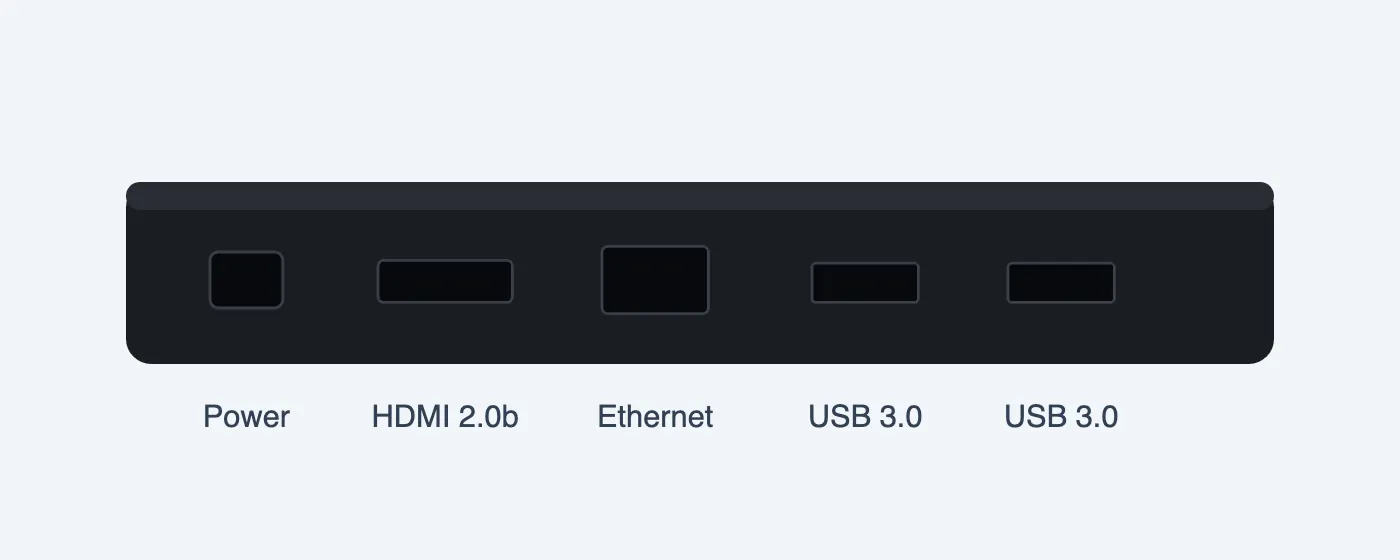
Round the back are the connections that matter: an HDMI 2.0b output for 4K HDR, a Gigabit Ethernet port, two USB 3.0 ports and the power socket. Wi-Fi (dual-band Wi-Fi 5) and Bluetooth 5.0 are built in.
In the box you get the Shield, the remote with two AAA batteries and a power adapter. You don't get an HDMI cable, so budget for one, and unlike some earlier Shield bundles there's no game controller. Any recent PlayStation or Xbox controller pairs over Bluetooth if you want one.
Setup
Setup takes about ten minutes, most of it the first software update, which usually downloads straight away. Sign-in is quickest using the Google Home or Google TV app on your phone, after which your Google Play apps install as normal. It's the standard Android TV process, with no extra accounts to create.
Performance: still the quickest box around
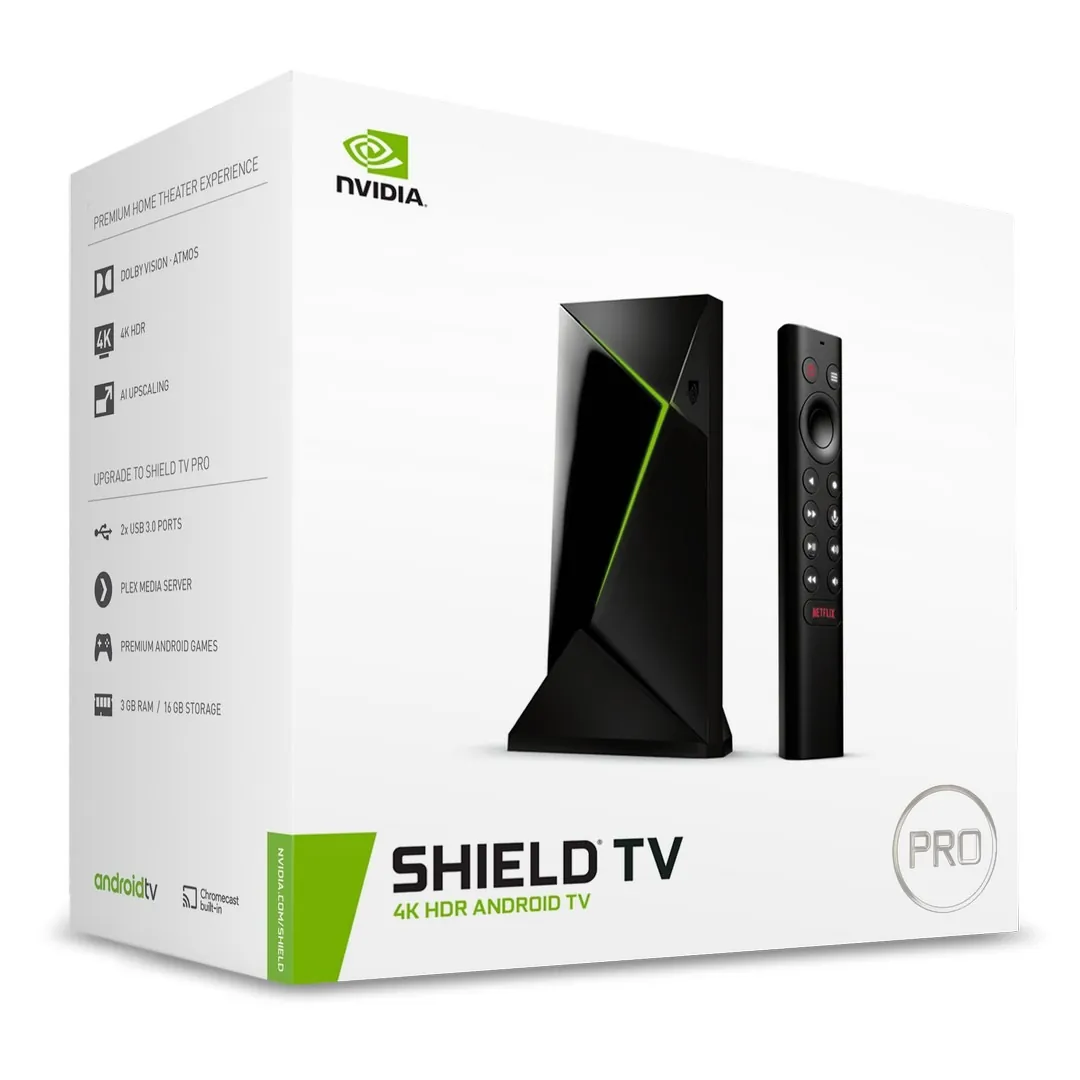
Inside is NVIDIA's Tegra X1+ chip with 3 GB of memory. On paper that's old: the chip family goes back almost a decade. In use it doesn't feel it. Menus are instant, apps open quickly and the box stays smooth with heavy apps and large libraries, where cheaper boxes start to stutter or crash on high-bitrate video. Owners who have run theirs for five years report it's as fluid as the day they set it up.
It runs the clean Android TV interface rather than Google TV. That splits opinion: some people miss Google TV's recommendations, while many owners prefer the plainer, faster home screen that puts your apps first.
The Shield TV Pro still feels quicker than boxes several years newer, and that is exactly what you want when you're scrolling a long channel list or guide.
Picture: 4K HDR and the famous AI upscaling
The Shield TV Pro plays 4K HDR at up to 60 frames per second in both Dolby Vision and HDR10, so it gets the best from almost any 4K TV. Its standout feature, though, is AI upscaling.
Most of what we watch isn't 4K: live channels, older shows and a lot of online video are HD or lower. The Shield's upscaler uses a neural network trained on thousands of hours of footage to sharpen that content for a 4K screen, and the difference is obvious: softer sources look cleaner and more detailed. You can switch it on and off with a button to compare. It works on video up to 1080p at 30 frames per second, not games or content that's already higher quality, and on its strongest setting it can be a touch aggressive with older, deliberately soft footage. Set to medium, it's one of the best reasons to buy the Shield.

Sound
Audio is just as complete. The Shield TV Pro supports Dolby Atmos and passes DTS:X through to a compatible soundbar or receiver over HDMI, and it plays high-resolution audio up to 24-bit/192 kHz. A 2025 software update added Auro-3D support too, which matters if you have a high-end home cinema setup.
The remote
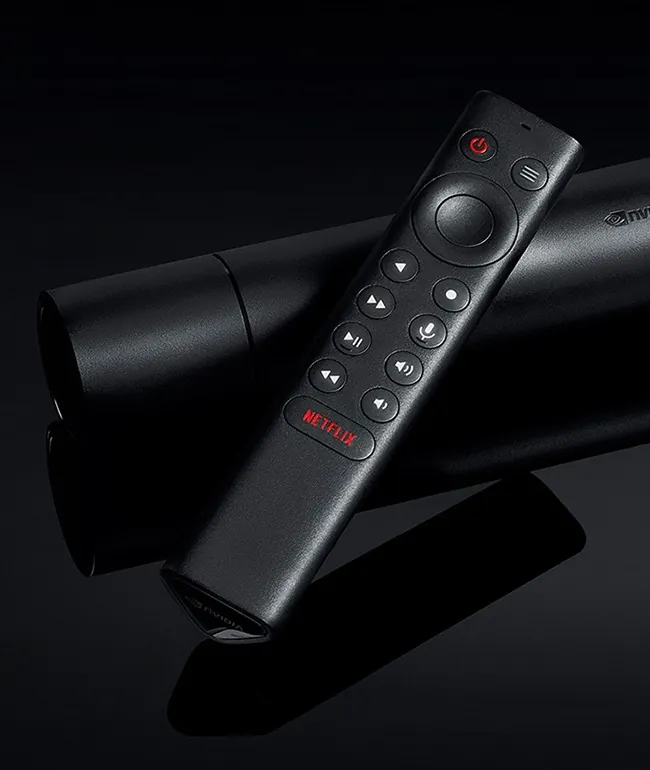
The remote is a big improvement on older Shields. It's a triangular prism with dedicated playback buttons, a navigation wheel, a microphone for voice search and a customisable button you can set to jump to any function. Its buttons light up when you pick it up, it can control your TV's power and volume through its built-in infrared blaster, and it runs on ordinary AAA batteries. It also has a remote-finder feature.
It isn't perfect. The rounded shape means it rolls off cushions easily, the navigation wheel itself isn't backlit, and the companion phone app can't control your TV's volume.
Storage and connections
Built-in storage is the Pro's weakest spot. You get 16 GB, and some of that is used by the system. That's plenty for apps, but not for recordings or a big offline library. The fix is easy: plug a USB flash drive, SSD or hard drive into one of the two USB 3.0 ports. Earlier Shield Pro models shipped with a 500 GB drive, so it's fair to feel short-changed.
The Gigabit Ethernet port is worth using. A wired connection makes live streams and large files steadier than Wi-Fi, especially in a busy home, and the Shield has no Wi-Fi 6, so a cable is the better choice.
Home media
If you keep your own films and shows, the Shield TV Pro is the box to beat. It plays almost any file format you throw at it, and with a USB drive attached it can even act as a media server for other devices in your home. Owners regularly call it the best media player they've used.
Gaming
The Shield is still a capable cloud gaming machine. NVIDIA's GeForce NOW streams PC games to your TV, and recent updates added support for the service's newer 4K HDR streaming. NVIDIA retired its own GameStream feature for streaming games from a home PC, but free game-streaming apps on Google Play do the same job. Bring your own controller.
Software support in 2026
This is where the Shield is unlike any other box. NVIDIA has kept updating it for years: the Shield Experience 9.2 update in early 2025 brought new features and Auro-3D audio, 9.2.1 and 9.2.2 followed in May and November 2025, and 9.2.4 arrived in February 2026 with stability fixes and a January 2026 security patch. Few Android devices of any kind get support like that.
One change to know about: after the 9.2 update, the Shield is no longer part of Google Home's smart home integration, so if you used it that way you'll need to set it up again through NVIDIA support.
Known problems
No device is flawless, and owners report a few recurring issues:
- Occasional freezes: some units lock up now and then. Owners have traced it to a USB drive (moving it to a powered hub helped), to router or network problems, or to an app; a restart clears it.
- Bluetooth pairing: some remotes and controllers can be fussy to re-pair. A recent update fixed remote issues for many owners.
- Sound settings and playback: one owner found the Night listening mode setting stopped certain films playing through their soundbar. If something won't play, check the audio settings.
- No AV1: newer streams that use the AV1 format aren't decoded in hardware. In practice most apps fall back to other formats.
If a player app stops working on the Shield, our checks before reinstalling an IPTV player work here too.
What the Shield TV Pro means for IPTV viewers
For watching TV through a player app, the Shield TV Pro ticks every box that matters:
- Speed with big lists: its processor and memory keep long channel lists and programme guides responsive, where budget boxes slow down.
- Ethernet: a wired connection keeps live TV steady.
- Storage for recordings: add a USB drive if your player records.
- Certified Android TV: it installs Android TV player apps from Google Play and gets security updates, unlike many generic boxes.
- Upscaling: live channels in HD get a visible boost on a 4K TV.
Not sure your current TV can run a player at all? Here's whether an IPTV player will work on your smart TV.
Shield TV Pro vs Shield TV vs Google TV Streamer
The standard Shield TV gives you the same picture quality and upscaling in a smaller tube, but without USB ports or the extra memory. The Google TV Streamer is newer, has more storage and supports AV1, but lacks the Shield's upscaling and raw speed. If you want the most capable box, the Pro is still the one.
| Shield TV Pro | Shield TV (tube) | Google TV Streamer | |
|---|---|---|---|
| Memory / storage | 3 GB / 16 GB | 2 GB / 8 GB + microSD | 4 GB / 32 GB |
| USB ports | 2 × USB 3.0 | None | USB-C (power) |
| Ethernet | Gigabit | Gigabit | Yes |
| AI upscaling | Yes | Yes | No |
| AV1 | No | No | Yes |
| Interface | Android TV | Android TV | Google TV |
| Best for | Power users, media, recording | Hiding behind the TV | Google ecosystem, newer formats |
Full specifications
| Processor | NVIDIA Tegra X1+ (256-core GPU) |
|---|---|
| Memory | 3 GB |
| Storage | 16 GB, expandable over USB |
| Video | 4K HDR at 60 fps; Dolby Vision, HDR10; H.265, VP9, H.264 |
| Audio | Dolby Atmos, Dolby Digital Plus, DTS:X passthrough; hi-res up to 24-bit/192 kHz |
| Connections | HDMI 2.0b (HDCP 2.2, CEC), Gigabit Ethernet, 2 × USB 3.0 |
| Wireless | Wi-Fi 5 (802.11ac, 2×2 MIMO), Bluetooth 5.0 |
| Remote | Voice, motion-activated backlight, IR blaster, programmable button, remote finder |
| Size and weight | 15.9 × 9.8 × 2.6 cm, 250 g |
| Operating system | Android TV (Google certified) |
Should you buy the NVIDIA Shield TV Pro?
Buy it if you want the fastest, most capable Android TV box: you watch through a player app with big channel lists, keep your own media, want HD to look its best on a 4K TV, or simply want a box that will keep being updated.
Skip it if you only use the main streaming apps. A cheaper streamer will do that for much less, and if you want AV1 and newer formats, look at a newer box.
Check the current price on Amazon, or see the GamGam TV player page for the player we're building on the Shield.
Frequently asked questions
Is the NVIDIA Shield TV Pro still worth buying?
Reviewers still rate it highly for speed, AI upscaling and connections. It's worth it if you want the quickest Android TV box with USB ports and Ethernet, less so if you only need basic streaming.
What's the difference between the Shield TV and the Shield TV Pro?
The Pro has 3 GB of RAM instead of 2 GB, 16 GB of storage instead of 8 GB and two USB 3.0 ports. The cheaper tube-shaped Shield TV has a microSD slot instead.
Does the Shield TV Pro support Dolby Vision and Dolby Atmos?
Yes. The 2019 models support Dolby Vision HDR and Dolby Atmos audio.
Can I install an Android TV IPTV player on the Shield TV Pro?
Yes. It runs Android TV with the Google Play Store, so players built for Android TV that list it as supported can be installed.
GamGam TV may earn a commission if you buy through links on this page, at no extra cost to you. As an Amazon Associate, we earn from qualifying purchases. How this works
Sources and credits
This review brings together published reviews, owner reports and official information. Our thanks to:
- TechRadar: Nvidia Shield TV Pro review (4/5)
- Expert Reviews: Nvidia Shield TV Pro (2019) review
- Android Central: Shield TV Pro still the best streaming device (long-term use)
- Tom's Guide: Shield TV vs Shield TV Pro
- NVIDIA: Shield TV Pro specifications
- NVIDIA Newsroom: official SHIELD product images
- Guru3D: Shield Experience 9.2.4
- 9to5Google: Shield TV November 2025 update
- Owner reports in the NVIDIA GeForce Forums and media-player community forums
- Video: "New Shield TV Pro and Shield TV First Look Unboxing Benchmarks Comparison" on YouTube